


Spreadsheet Models for Managers
Getting Access to Spreadsheet Models for Managers
If  you use Excel to model businesses, business processes, or
business transactions, this course will change your life. You’ll learn how to create tools for yourself that will amaze
even you. Unrestricted use of this material is available in two ways.
you use Excel to model businesses, business processes, or
business transactions, this course will change your life. You’ll learn how to create tools for yourself that will amaze
even you. Unrestricted use of this material is available in two ways.
- As a stand-alone Web site
- It resides on your computer, and you can use it anywhere. No need for Internet access.
- At this Web site
- If you have access to the Internet whenever you want to view this material, you can purchase on-line access. Unlimited usage. I’m constantly making improvements and you’ll get them as soon as they’re available.
To Order On Line
| Order "Spreadsheet Models for Managers, on-line edition, one month" by credit card, for USD 69.95 each, using our secure server, and receive download instructions by return email. |

| Order "Spreadsheet Models for Managers, on-line edition, three months" by credit card, for USD 199.00 each, using our secure server, and receive download instructions by return email. |
| Order "Spreadsheet Models for Managers, downloadable hyperbook edition" by credit card, for USD 199.00 each, using our secure server, and receive download instructions by return email. |
To Order by Mail
Make your check payable to Chaco Canyon Consulting, for the amount indicated:
|
And send it to: Chaco Canyon Consulting 700 Huron Avenue, Suite 19C Cambridge, MA 02138 |
To use the course software you’ll need some other applications, which you very probably already have. By placing your order, you’re confirming that you have the software you need, as described on this site.

Spreadsheet Models for Managers
This reading is especially relevant for Session 4Reference Operators
Formulas in Excel can include operators that combine arguments to produce intermediate results that are used to evaluate the formula. You really already know about operators, but you may be unfamiliar with the use of this word in this way. Examples of arithmetic operators are +, -, /, and *, which are, respectively, addition, subtraction, division, and multiplication. You know how these work — let’s look at some new ones.
Operators do their work on operands. For example, in the expression “1+3”, 1 is the first operand and 3 is the second operand.
Some operators are called “infix” operators. Examples of infix operators are the arithmetic operators you’re familiar with. Another infix operator is the exponent operator used for powers of numbers. For example, the formula 4^2 means the same as 42. These operators are called infix because they sit “in between” their operands.
Some operators are “matchfix” operators. They come in pairs, like the left and right parentheses. For example, 2*(4+1) is an operator expression that evaluates to 10. It contains two arithmetic operators, * and +, and two matchfix operators, “(” and “)” for grouping. Another of Excel’s matchfix operators is the pair of double-quotes ("). In Excel, double-quote pairs are used to encase character strings. For example "qwerty" is a character string constant, wrapped in double-quotes, which are Excel’s string grouping operators.
There are other operators in Excel that you might not have run into before. For example, the ampersand (&) joins, or concatenates, two strings together. "qwerty"&"234" evaluates to "qwerty234".
Reference operators
The three reference operators are the range operator, the union operator, and the intersection operator. They’re represented respectively by the characters colon (range), comma (union), and space (intersection). All three are infix operators.
The range operator (colon), which is an infix operator, is used to join two cell references to make a range reference. The resulting range is the rectangle formed by the first operand and the second operand. A1:D5 defines the range from A1 to D5. The range reference A1:A1 isn’t illegal — but it’s degenerate. It’s exactly the same as A1. The expression C:C is the (relative) reference to column C.
There are two other reference operators. They’re also used to combine references in ways that produce new references.
The first is the intersection operator (space), which is an infix operator. When it’s inserted between two references, it returns the intersection of those two references. The references can be single cells, ranges, or complex combinations of references constructed with any of the reference operators. They can also be the results of any macro or worksheet function that returns a reference, such as offset or index. The intersection of two ranges is the set of cells that lie in both ranges. It can be either a single cell or a (possibly discontiguous) collection of cells. If two references don’t intersect at all, Excel returns a #NULL! error value. In Figure 1, the cell C4 is the intersection of B2:C4 and C4:D7.
The last reference operator is union, represented by a comma. Like intersection and range, it too is an infix operator and returns a reference. Just as intersection creates and returns the intersection of two references, union creates and returns the union of two references. The union of two references is the collection of cells that lie in either one (or both) of the references. For example, (B2:C4,C4:D7) is a reference to all the cells in either of the two rectangular ranges shaded in Figure 1.
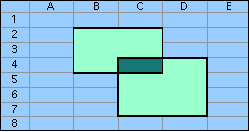
As an exercise, see if you agree that C2:C7=(B2:C4,C4:D7) C:C.
A list of Excel’s operators
Believe it or not, Excel has 16 infix operators, 5 matchfix operators, 3 prefix operators and a postfix operator.
Infix operators
| + | addition |
| - | subtraction |
| * | multiplication |
| / | division |
| ^ | exponentiation |
| > | is greater than |
| < | is less than |
| = | is equal to |
| >= | is greater than or equal to |
| <= | is less than or equal to |
| <> | is not equal to |
| & | concatenation of strings |
| Space | reference intersection |
| Comma (,) | reference union |
| Colon (:) | range reference defined by two cell references |
| ! | separate worksheet name from reference |
Matchfix operators
| Left Side | Right Side | Operation |
| " | " | string constant |
| { | } | array constant |
| ( | ) | arithmetic grouping or function arguments or reference grouping |
| ' | ' | grouping worksheet name |
| [ | ] | grouping workbook name, or relative reference in R1C1 style |
Postfix operators
| % | percentage |
Prefix operators
| - | negative |
| + | plus |
| $ | Next component of an A1 reference is absolute |

Last Modified: Wednesday, 27-Apr-2016 04:15:26 EDT
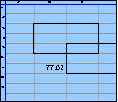
The space character, in many cases, doesn’t change the value of a formula. For instance, these two formulas return the same value:
- =A1 + 2
- =A1+2
Some people think that well-placed spaces make formulas easier to read. Although that might be true, the practice is both inconvenient and extremely dangerous. More
Excel’s online help, and many of the how-to books you can buy, provide long lists of keystroke shortcuts for carrying out specific operations, such as inserting rows, selecting regions, or deleting columns. And they are useful.
But the true power of the keyboard comes not from using these particular commands. Rather, it comes from learning combinations that are useful for particular situations that you encounter frequently.
For instance, there’s no command for deleting the rows that contain the selected cells, but there is a combination:
- Shift+Space selects the rows that contain the selection.
- Ctrl+- deletes the now-selected rows.
And so, Shift+Space Ctrl+- deletes the rows containing the selection.
Learning a vast array of keystroke commands is probably less useful than learning the keystroke combinations that do exactly what you need to do most often.